Aztec
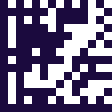
The code on a rail ticket, built to work on a screen as well as on paper.

- Type
- Matrix (2D)
- Finder pattern
- A bullseye at the centre, not the corners
- Quiet zone
- None required, unlike most symbologies
- Standard
- ISO/IEC 24778
Aztec puts its finder pattern in the middle — concentric squares a scanner locks onto — and builds the data outwards around it. That one decision removes the need for a quiet zone, the blank margin most barcodes require in order to be found at all.
On a crowded ticket or a phone screen, that margin is exactly what you do not have. Aztec can sit right against surrounding text and still read, which is why transport operators adopted it for tickets and passes.
It is efficient at small data sizes too, so a short booking reference does not need a symbol much larger than the reference itself — useful when the ticket is being displayed on a screen held up to a gate reader.
Where you meet it
Train and transit tickets.
Can a phone scan an Aztec code?
Yes, as standard. The keyboard reads Aztec and types the value into whatever field you are in.
How to scan it with your phone
- 1
Install Barcode & QR Scanner Keyboard from Google Play and enable it as a keyboard.
- 2
Open Settings → Scanning engine and choose TRAKWIND Scan.
- 3
Tap the barcode key on the keyboard and point the camera at the code.
The value is typed into whatever field you were already in — a spreadsheet, an ERP screen, a web form. There is nothing to integrate.


Read it with the phone in your pocket
Free on Google Play. No licence, no extra hardware, and nothing to connect.